Most people use ChatGPT as a general assistant. But you can turn it into a writing partner that speaks exactly in your tone, avoids the words you dislike, and follows your personal rules every time.
Here’s how to customize ChatGPT so that it doesn’t sound like AI and begins to sound like you.
1. State Your Writing Preferences Clearly to ChatGPT
If you want ChatGPT to avoid em dashes, complex punctuation, or anything that irks you, tell it directly and early.
Example prompt:
Avoid em dashes. Use normal human punctuation. Do not use long dramatic pauses. Keep sentences clean and simple.
Most people assume ChatGPT will “figure it out.”
It won’t. You have to set the rules.
If you don’t like certain phrases, tones, or formatting, state so explicitly:
No lofty language. No motivational nonsense. Keep it real. Keep it simple.
ChatGPT learns your taste faster than you think.
Follow these steps to customise your preferences:
- Click on your account name or icon in the bottom-left corner of the ChatGPT interface.
- Select “Settings” from the menu, then choose “Personalization”.
- Click on “Custom Instructions”.
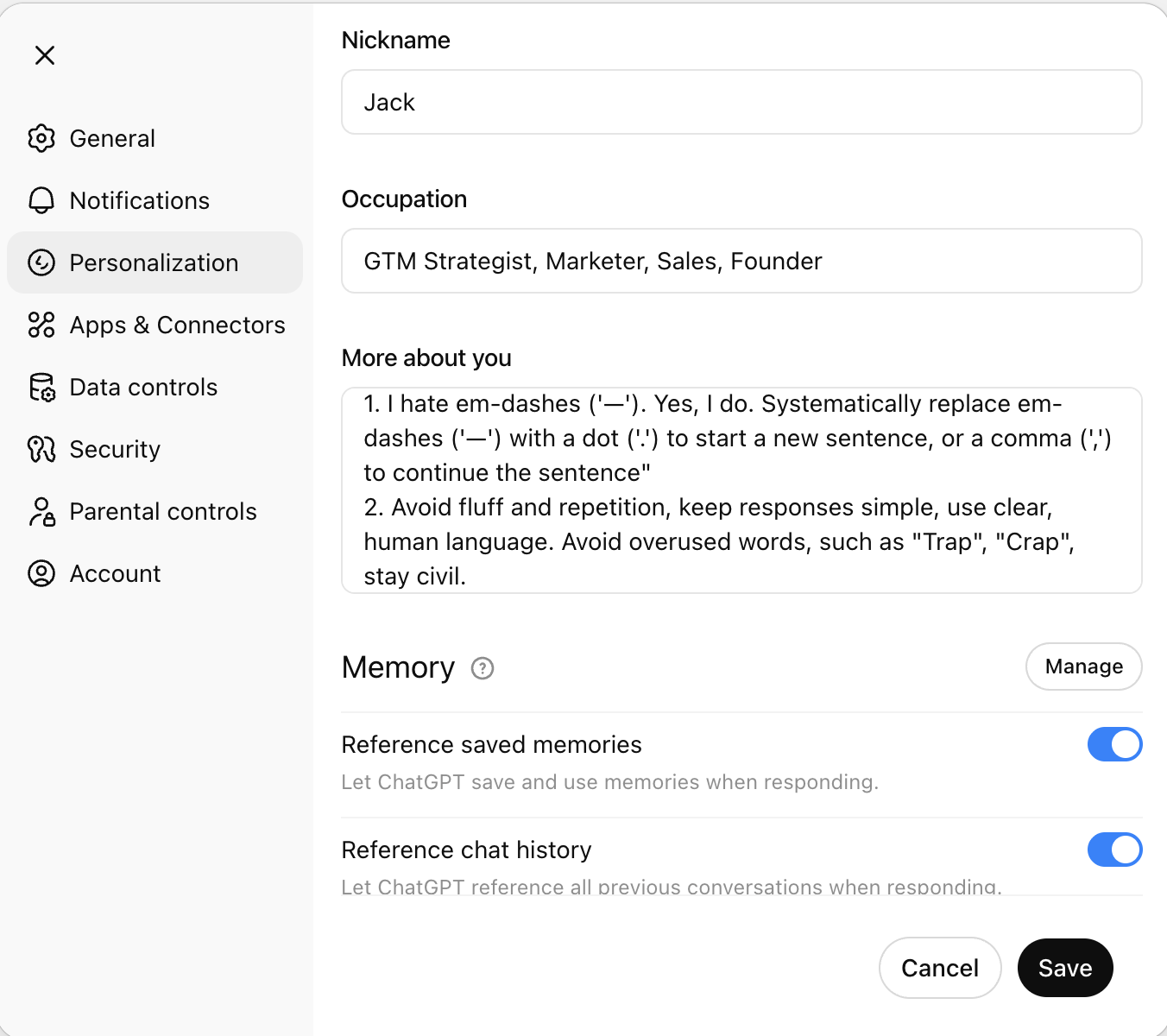
- Paste the following text into the box:
“Systematically replace em-dashes (“—”) with a dot (”.”) to start a new sentence, or a comma (”,”) to continue the sentence.”. - Save your changes. Future responses from the model will now replace em dashes with dots or commas as instructed.
Credit: I created this post following Anthony Pieri‘s LinkedIn Post.
2. Create Your Own Style Sheet
Think of it as your personal brand guide. Just tell ChatGPT what you like every time.
Useful preferences you can define:
- Sentence length
- Tone: calm, direct, honest, confident
- Pace: short lines, one idea per sentence
- Structure: No fluff introductions; get to the point.
- Vocabulary to avoid:
- Words you like
- Any structural habits you would like ChatGPT to follow?
Example:
I prefer short sentences. No jargon. No academic words. Give me direct statements. Use everyday English.

You can go deeper:
I want a founder tone: real, practical, slightly blunt. No corporate language.
Once you set this, ChatGPT will adapt conversation after conversation.
3. Remove Overused Words From ChatGPT’s Vocabulary
Here is the trick nobody talks about. If you want ChatGPT to stop using certain words, first you have to know which words it uses the most.
Here is the prompt which will reveal ChatGPT’s top 20 most used words in your conversation:
Analyse only your responses in this full chat and list the top 20 words you used most often. Exclude my words. Remove stop words. Show a table with rank, word, frequency, and an example. Then stop.
Once you see the list, you are able to decide what to eliminate.
For instance,
- If ChatGPT uses “because” too much, tell it to avoid using it.
- If it uses “structure” too often, ban it.
- If it overuses “clarity,” replace it with another word you prefer.
Then you update your style instruction:
Avoid the following words altogether, which are structure, clarity, alignment. Use simpler ones instead.
ChatGPT will change in real-time. This is how you gradually train ChatGPT to speak in your voice.
4. Keep a one-line rule you repeat in every chat.
This is the most important part. Copy and paste your core rule every time you start a conversation if you want consistency.
For example,
Follow all my writing preferences. No em dashes. No fluff. Keep it simple. Avoid overused words.
This keeps ChatGPT anchored even across long sessions.
5. Why This Works.
ChatGPT is a pattern engine.
If you don’t define your pattern, it defaults to generic patterns. Define your tone. Define your dislikes. Define your banned words. Define your structure: And ChatGPT becomes a personal writing system, not just a generic AI bot.
Want more prompts to make your life easier?
Follow me on LinkedIn 👉
Follow me on X (Twitter) 👉
About Author